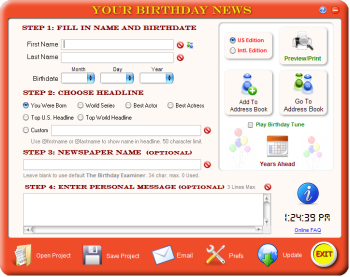
The main screen is where you
enter the data needed to generate the news page.
Step 1:
To begin, enter the first name and last name of the birthday recipient. Then
select the month, day and year they were born. All of these are
mandatory.
Step 2: Select the headline you would like
to use. The default is You Were Born. If you wish to add your own custom
headline instead, tick the Custom button. Then enter your custom headline. You
are limited to 50 characters. To include the first or last name, use @firstname
for the first name, and @lastname for the last name wherever you want it to show
in the line.
Step
3 : You can optionally enter a
custom newspaper name. Maximum 40 characters. Example: the name of the hometown
newspaper in the area they were born. If you leave this blank, it will default
to The Birthday Examiner
.
Step 4
: You can optionally enter a message, which will show at the bottom of
the page. It can be personal, or your company name and contact info. The maximum
lines you can enter are 3. Additional lines may not show on
the page.
We've also provided a link to our online
FAQ.
Using the
buttons at the bottom of the screen, you can open a saved project, save the
project, set preferences
, check
for software and database updates, or exit the program. Your address book database
will automatically be saved upon exit. Checking the Play Birthday Tune box will play
a little happy birthday tune to enhance the moment. Uncheck the box to stop
it.
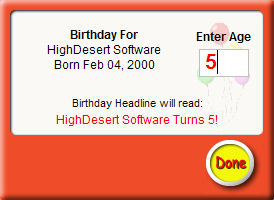
Years
Ahead : Allows you to send someone a different news page each
year, depicting events that occured at a given age. Example: what was happening
when John Doe was 5 years old. Just type in the desired age, and the software
will automagically render a page for the year they were that age. This will
automatically change the headline to "[Firstname] [Lastname] Turns [age]!. Any
other headlines chosen will be overriden.
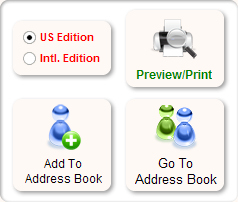
US/International
Edition - Before previewing/printing, you can select the version
of news page you want: US or International Edition. The International edition
contains non-US specific events, and includes Astrological Facts in place of
National Price Averages.
Preview/Print - Click to preview
and print the paper.
Add To Address Book - Adds the
current birthday info to the Address Book.
Go To Address
Book - Takes you to the Address Book.
 Your Birthday News